Search the Community
Showing results for tags 'mistika vr'.
Found 5 results
-
Hi all, A new version of Mistika VR is now available. This upgrade adds stabilization and rendering improvements, along with additional fixes. This latest version is already available to all active users. Go to the 'downloads' section in your Online SGO Account to upgrade! ✨ New Features QooCam Stabilization Support – Added stabilization support for QooCam footage, expanding camera compatibility and enabling stabilization workflows for QooCam media. Obsidian Pro Stabilization Support – Added stabilization support for Obsidian Pro footage, allowing stabilization processing for content captured with this camera system. GPU-Accelerated MOV Rendering – Added GPU-accelerated rendering for MOV H.264 and MOV H.265 exports. Rendering can now leverage Metal or CUDA for faster export performance. 🚀 Improvements Enhanced Clip Merge Workflow – Clip merging has been improved and now supports merging clips from right to left, providing greater flexibility during editorial operations. Merge Validation Warning – Added a warning message when attempting to merge clips with a different number of layers, helping prevent unintended merge results and improving workflow transparency. 🛠 Fixes FPS Value Stability – Fixed an issue that could occur when the FPS value was set to 0. The application now handles invalid FPS values correctly. Source Timecode Preservation – Resolved an issue where SourceTC was lost after merging clips. Source timecode is now correctly preserved throughout the merge process. Render Range Preservation – Fixed an issue where In Point and Out Point render settings were lost after merging clips. Render ranges are now retained as expected.
-
Hi all, A new release of Mistika VR is now available. This new version brings new stability improvements. You can already download it from your Online SGO Account. 🛠 FixesRAW Parameter Propagation – Resolved an issue where the “Propagate in Raw Params” functionality was not working as expected. Raw parameter changes now propagate correctly across relevant settings. macOS UI Dropdown Stability – Fixed a problem where the Project Settings editor dropdown menu would close unexpectedly. The menu now remains open, allowing reliable interaction. Canon RAW Parameters Display – Corrected an issue where Canon RAW parameters were not displayed properly in the RAW Params view. Values now appear with accurate formatting and consistency.
-
Hi all, A new version of Mistika VR is now available adding new improvements. This version is already available in the Downloads section of your SGO Online Account. Fixed Bugs and Improvements: Projects created in the 10.5 version of Mistika VR are now compatible with the new features introduced in 10.6 - Render Options and CDL Grade. Autocalibrate "Error 6" and "Error 3" now displays clearer messages. Fixed issue related with overwritten files in Name Convention when installing additional Mistika Technology software. Insta360 Pro 2 Audio.mp4 files are now supported with the “Import Stabilization metadata” feature. Fixed issue rendering formats with 4444 Image. The Streaming driver is now stopped when the remote session is disconnected.
-
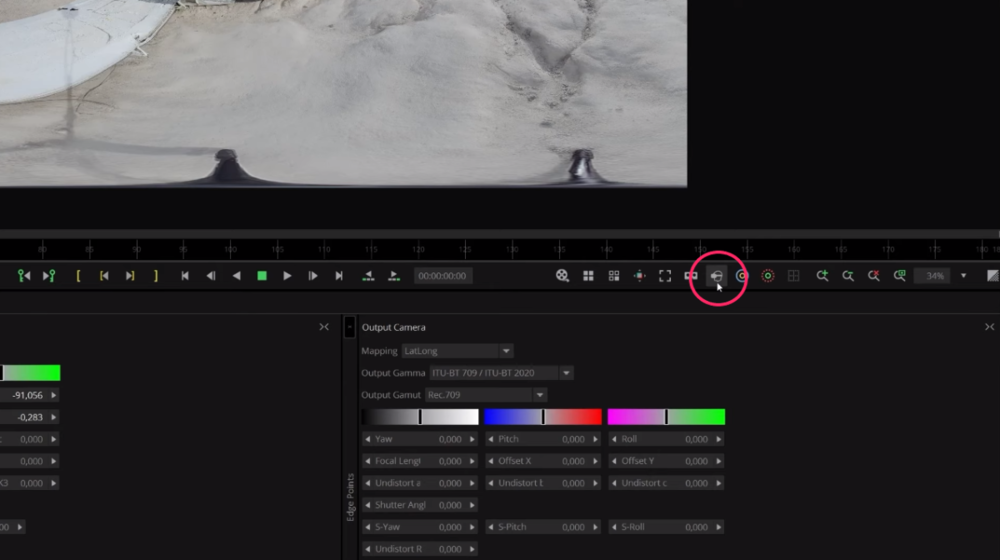
Hi everyone! We have released a new version of Mistika VR, introducing live output to VR headset* and color space conversion functionality. You can now download this latest version from your Online SGO Account. *The VR Headset Preview functionality is supported through the integration of DeoVR, a platform-agnostic and completely free of charge VR player. Also, all active subscribers and the ones who signed up during the open beta period got the Headset feature included in their subscriptions free of charge as a part of the SGO Loyalty Program (even in the personal editions). New features VR Headset Preview: Mistika VR users are now able to preview stitched VR media without the need of rendering in the headsets using the output to DEO VR player. Color Space Conversion: Color Science has been added to Mistika VR, enabling the setting of the input/output gamma and gamut with all the industry-standard color spaces, including ACES. Input and output gamma/gamut may differ, making possible delivery in a color space different from the source media. STMap Integration: Facilitating the workflow between Mistika VR and compositing softwares such as Nuke, the newly added STMaps provide all the stitch information, not only geometry, but also optical data. RAW debayer parameters exposed: Media in RAW format now allows RAW data adjustments (debayer, sharpening, ISO etc, depending on camera model). Fixes A short segment can now be properly stabilized without turning the image black. The “source name” render option now works correctly with the ZCam input media. Sync by TC of one shot breaking other shots present, is now fixed. Changing stereo mode in Mistika Boutique no longer affect the stereo mode in Mistika VR. Improvements Some new presets added. All existing stitches and presets will now automatically update their list of parameters (adding gamma/gamut, K1,K2,K3 lens distortion per camera, some others) An error message is displayed if the metadata stabilization is not imported correctly. Known issues Teche media performance in Windows is slower than in previous versions. When logging in the SGO Activation Tool, please wait a couple of seconds before opening the Advanced Mode. Mistika VR interface does not display correctly on the latest Monterrey macOS version when Firewall is activated. How to enable VR Headset preview in Mistika VR? 1. Right next to the VR view icon you will notice a brand-new HS button. When you click on it, a pop up window will appear, instructing you to copy your computer IP website address and paste it in the DeoVR player. 2. Open the DeoVR player on your preferred platform and paste the IP address. If you do not have the DeoVR player installed yet, click here and install the application. IMPORTANT: Please make sure to use the same network connection for both - the workstation where you run the Mistika VR on and the VR Headset where you want to see the preview. 3. Make sure that you click the play button in Mistika to get the video output in DeoVR.

-
Hi everyone! We have released an upgraded version of Mistika VR. You can download now this new version from your Online SGO Account. New features KanDao 60 fps resolutions: 5616x2012 and 6016x2012 support Fixes Fixed move interface between different resolution monitors.